

What You’ll Build
- An AG2 (AutoGen 2) agent that behaves like a documentation expert.
- Triggered only when invoked (e.g.,
@knowledge). - Retrieves & cites snippets from an on-disk knowledge store.
- Integrated into CometChat conversations with streaming responses.
Prerequisites
- Python 3.10+ and
pip. OPENAI_API_KEYin a.envfile (used for embeddings + chat completions).- Optional overrides:
KNOWLEDGE_AGENT_MODEL(defaultgpt-4o-mini)KNOWLEDGE_AGENT_EMBEDDING_MODEL(defaulttext-embedding-3-small)KNOWLEDGE_AGENT_TOP_K,KNOWLEDGE_AGENT_TEMPERATURE, etc.
- CometChat app credentials (App ID, Region, Auth Key).
Quick links
- Repo (examples): ai-agent-ag2-examples/ag2-knowledge-agent
- Agent source: agent.py
- FastAPI server: server.py
- Sample web embed: web/index.html
How it works
This project packages a retrieval-augmented AG2 agent that:- Ingests sources into namespaces using the
KnowledgeStore. POST payloads to/tools/ingestwith URLs, local files, or raw text. Files (.pdf,.md,.txt) are parsed and chunked before embeddings are stored underknowledge/<namespace>/index.json. - Searches namespaces via
/tools/search, ranking chunks with cosine similarity on OpenAI embeddings (defaults to top 4 results). - Streams answers from
/agent. The server wraps AG2’sConversableAgent, emits SSE events for tool calls (tool_call_start,tool_call_result) and text chunks, and always terminates with[DONE]. - Cites sources. The agent compiles the retrieved snippets, instructs the LLM to cite them with bracketed numbers, and appends a
Sources:line. - Hardens operations: namespaces are sanitized, ingestion is thread-safe, and errors are surfaced as SSE
errorevents so the client can render fallbacks.
agent.py— KnowledgeAgent, store helpers, embedding + retrieval logic.server.py— FastAPI app hosting/agent,/tools/ingest,/tools/search,/health.knowledge/— default storage root (persisted chunks + index).web/index.html— CometChat Chat Embed sample that points to your deployed agent.
Setup
Clone & install
git clone https://github.com/cometchat/ai-agent-ag2-examples.git then cd ai-agent-ag2-examples/ag2-knowledge-agent. Create a virtualenv and run pip install -r requirements.txt.Configure environment
Create a
.env file, set OPENAI_API_KEY, and override other knobs as needed (model, temperature, namespace).Prime knowledge
Run
python server.py once (or uvicorn server:app) to initialize folders. Use the ingest endpoint or the provided knowledge samples as a starting point.Run locally
Start FastAPI:
uvicorn server:app —reload —host 0.0.0.0 —port 8000. Verify GET /health returns {"status": "healthy"}Project structure
- Dependencies: requirements.txt
- Agent logic: agent.py
- Knowledge store: knowledge/
- API server: server.py
- Web sample: web/index.html
Core configuration
Environment variables
Environment variables
Knowledge ingestion schema
Knowledge ingestion schema
Streaming response shape
Streaming response shape
Step 1 - Ingest documentation
POST to /tools/ingest
Supply a mix of URLs, file paths, and inline text. The server fetches, parses (PDF/Markdown/Text), chunks, embeds, and persists everything.
Step 2 - Ask the knowledge agent
Handle SSE
Streamed events include tool telemetry and text deltas. Buffer them until you receive
[DONE].Step 3 - Deploy the API
- Host the FastAPI app (Render, Fly.io, ECS, etc.) or wrap it in a serverless function.
- Expose
/agent,/tools/ingest, and/tools/searchover HTTPS. - Keep
KNOWLEDGE_AGENT_STORAGE_PATHon a persistent volume so ingested docs survive restarts. - Harden CORS, rate limiting, and authentication before opening the endpoints to the public internet.
Step 4 - Configure CometChat
Open Dashboard
Go to app.cometchat.com.
Provider & IDs
Set Provider=AG2 (AutoGen), Agent ID=
knowledge, Deployment URL=public /agent endpoint.Optional metadata
Add greeting, intro, or suggested prompts such as “@knowledge Summarize the onboarding guide.”
For more on CometChat AI Agents, see: Overview · Instructions · Custom agents
Step 5 - Customize in UI Kit Builder
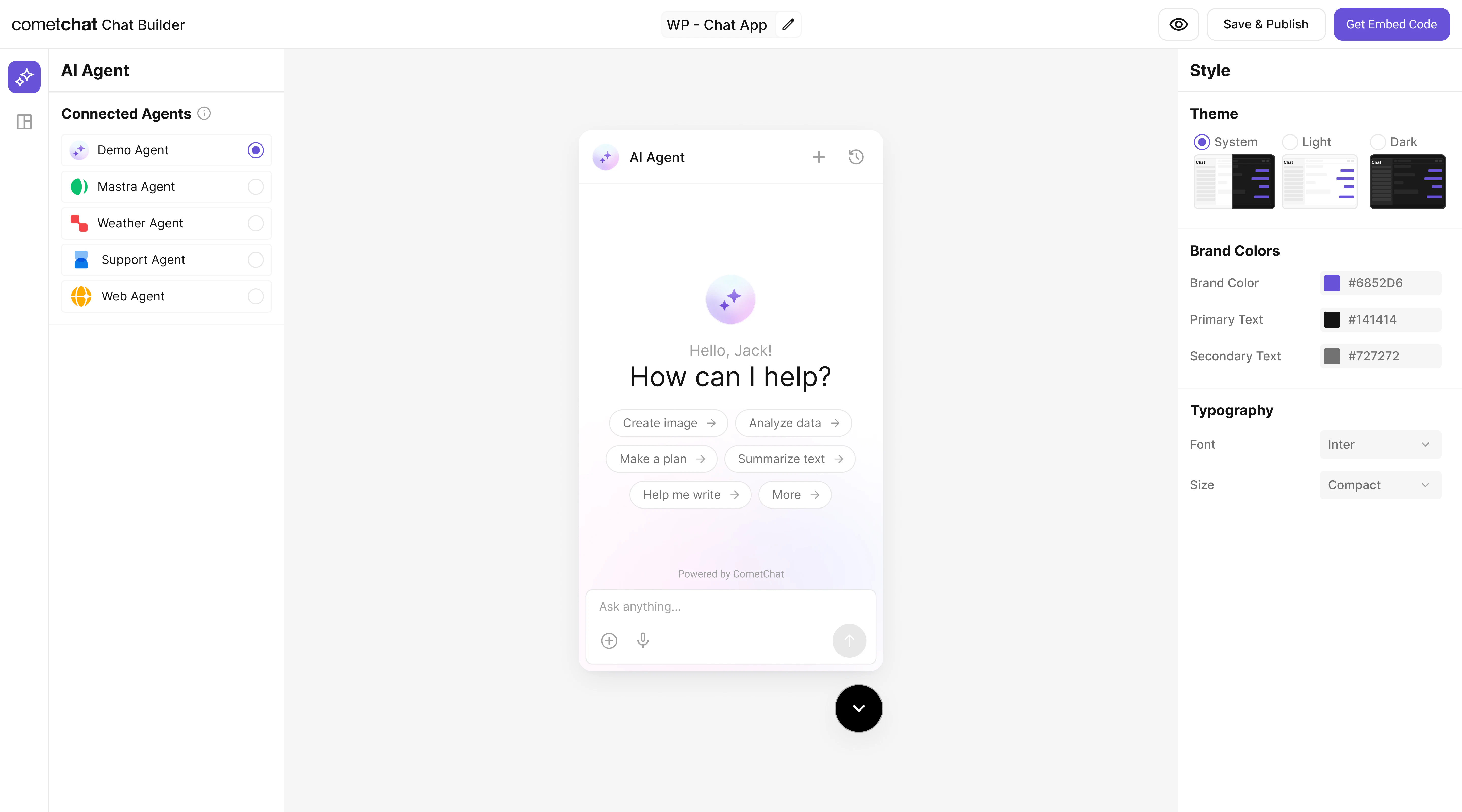
Step 6 - Integrate
Once configured, embed the agent in your product using the exported configuration.Widget Builder
React UI Kit
Pre Built UI Components
The AG2 Knowledge agent you connected is bundled automatically. End-users will see it immediately after deployment.
Step 7 - Test end-to-end
Security & production checklist
- Protect ingestion routes with auth (API key/JWT) and restrict who can write to each namespace.
- Validate URLs and file paths before fetching to avoid SSRF or untrusted uploads.
- Rate limit the
/agentand/tools/*endpoints to prevent abuse. - Keep OpenAI keys server-side; never ship them in browser code or UI Kit Builder exports.
- Log tool calls (namespace, duration) for debugging and monitoring.
Troubleshooting
- Agent replies without citations: confirm the retrieval step returns matches; check embeddings or namespace.
- Empty or slow results: ensure documents were ingested successfully and the top-k limit isn’t set to 0.
503 Agent not initialized: verify server logs—KnowledgeAgentrequiresOPENAI_API_KEYduring startup.- SSE errors in widget: make sure your reverse proxy supports streaming and disables response buffering.
Next steps
- Add new tools (e.g.,
summarize,link_to_source) by extending the AG2 agent before responding. - Swap in enterprise vector stores by replacing
KnowledgeStorewith Pinecone, Qdrant, or Postgres. - Schedule re-ingestion jobs when docs change, or watch folders for automatic refreshes.
- Layer analytics: log
tool_call_result.matchesfor insight into content coverage.